


Turn rough sketches into portfolio-ready renders with control, not guesswork.
Learn the exact Vizcom workflow professional designers use to create
clean, controlled, high-quality visuals without relying on random AI outputs.
The gap is growing and most designers
are on the wrong side of it.
X
X
X
X
Can generate visuals but not cohesive concepts
Outputs lack consistency and design intent
No repeatable workflow
Vizcom is driving the result more than the designer
And it shows in the work immediately.
That's why your work feels random while others are pulling ahead fast.
This course shows you how to take control so every output follows your design decisions, not the AI's.
The 4-step workflow
behind every result.
This is the exact process I use to turn rough sketches into controlled, portfolio-ready designs using Vizcom.
Step 1: Build the foundation
From sketch to precision.
Not guesswork.
Follow a structured work flow to transform rough sketches into clean controlled renders without relying on random AI outputs.
This isn't a prompt problem. If you don't control the workflow, everything breaks.

Step 2: Rapid Exploration
Rapid concept exploration.
Full control.
Apply color, materials and finish through structured workflow
so every result is intentional not random.
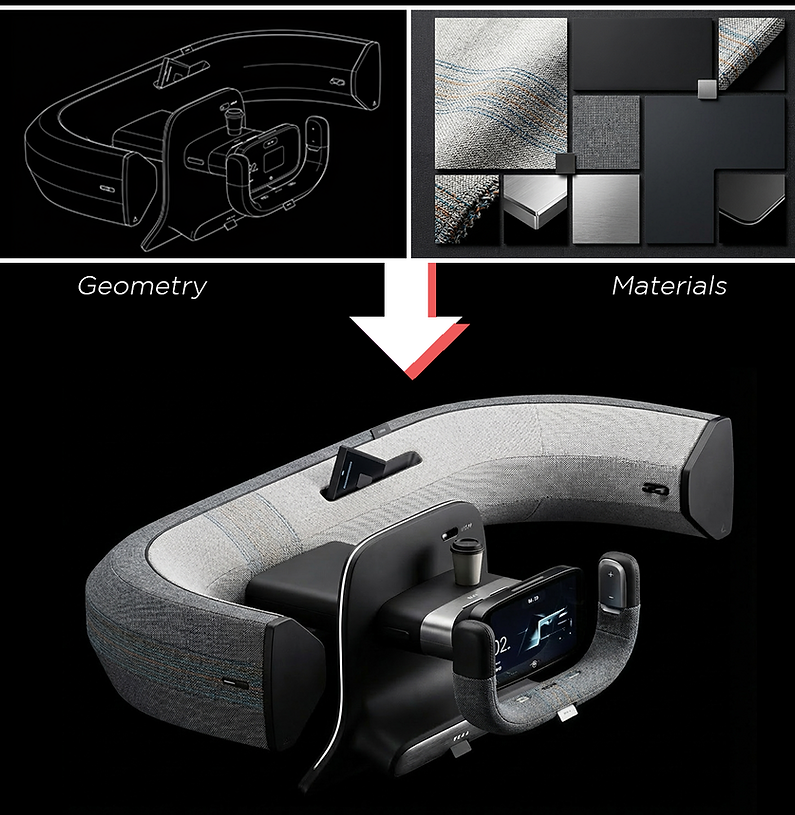
Take control of AI.
Design with intent.
Learn how to guide Vizcom with intent so every variation
aligns with your design vision not randomness.
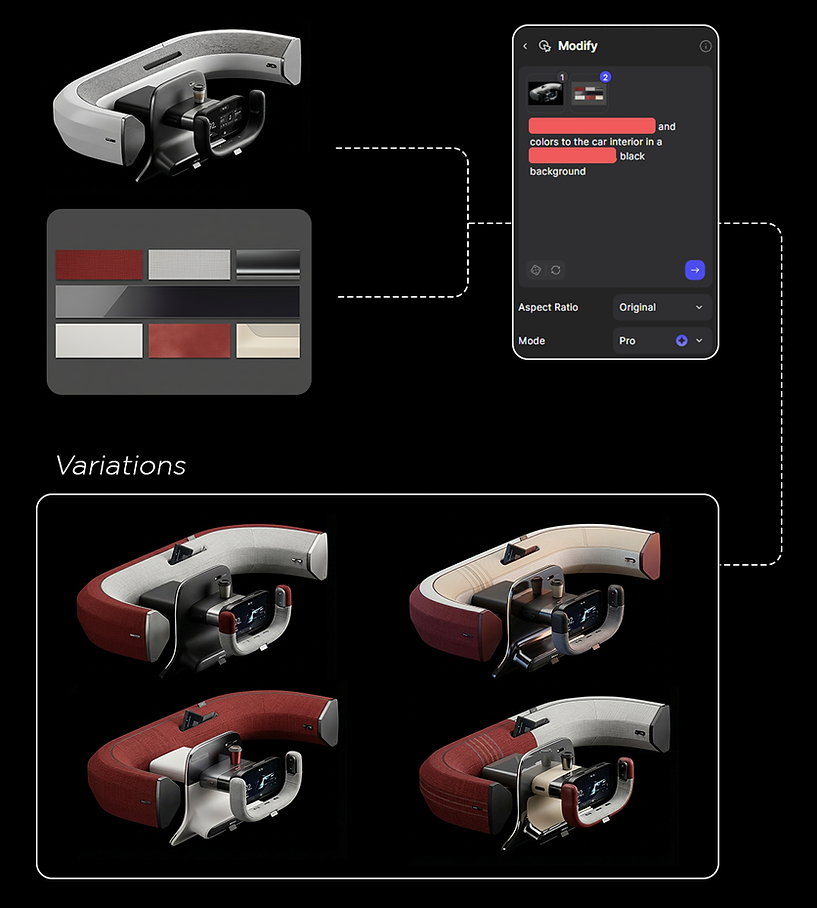
Step 3: Refine & Control
No detail too small.
Refine small details like UI, materials and surfaces with precision
without restarting your design.

Step 4: Presentation & Animation
Turn rough concepts into
cinematic animations fast.
Storyboards, renders and animations all working together.


You're not trying to generate images
you're trying to design.
If you're serious about design...

Turn rough ideas into clear, portfolio-ready concepts
Have full control over form, materials and final output
Build a repeatable workflow, not random results
Move from sketch > concept > render > animation without losing design intent
Not replacing your design skills...
it amplifying them.
And once you understand the workflow, everything changes.
The tool is simple.
The creative decisions are what matter.

Be the director for your vision.

Real results from real students.
Built using the exact workflow in this course.

What students are saying.
If it wasn't for your courses and the feedback,
I wouldn't have made it this far.
(Received a $30,000 scholarship)
-Emiliano
This skill feels completely overpowered.
Once it clicks, it gives you an unfair advantage...
it's honestly like a cheat code.
-Chase
Frequently Asked Questions
Is this course beginner-friendly? Yes. You don’t need prior experience with Vizcom to follow along. The course focuses on understanding how to work with AI intentionally, starting from simple sketches and building up complexity as needed.
Will Vizcom replace my own design decisions? No. The course emphasizes maintaining control over form, color, materials, and overall direction. Vizcom is presented as a refinement and iteration tool, not an automated design solution.
What do I need to take this course? You’ll need access to Vizcom and a basic sketch or image to work from. The techniques apply whether you’re working with rough concepts or more developed designs.
Is this course included in the Designer’s Bundle? Yes. AI Mastery: Vizcom is included in the Designer’s Bundle along with all other courses and future updates.

Learn from an industry designer
I’ve spent over 10 years in the design industry helping designers build real skill through professional work, teaching, and instruction at ArtCenter and CCS.
This course is built around the same principle I teach serious designers: control your process, make stronger decisions, and let the quality of your workflow show up in the final result.
That’s why AI Mastery: Vizcom is focused on structure, clarity, and portfolio-ready outcomes — not random outputs, prompt tricks, or generic AI hype.


Don't compare yourself with other people.
Compare yourself with who you were yesterday.
Worked with:


This is for you if your results look like this:
-
Your AI outputs feel random
-
You can't control materials or lighting
-
You rely on prompts without understanding them
-
Your results aren't portfolio-ready
If this sounds familiar, this is exactly what this workflow fixes it.
The difference isn't the idea. It's control.
Same concepts. Completely different outcomes when the workflow is right.
*These are real sketches designers brought in and what they became using the system

Before: Loose sketch with unclear structure
After: Controlled geometry, materials and lighting

Before: Rough concept with no presentation
After: Cinematic, portfolio-ready result

Before: Lost in sketch form
After: Reads instantly as a finished design
This isn't about making things "look cool."
It's about removing guesswork
from your process.

Before: Concept
After: Professional presentation

Before: AI guesswork
After: Designed result

This is exactly what the
4-step workflow is built for.
Who this course is for?
What this IS
-
A controlled design workflow
-
Used in real industry environments
-
Built for portfolio-level results
What this is NOT
-
Not prompt tricks
-
Not random AI outputs
-
Not beginner fluff
Inside the 4-step system
43 step-by-step lessons. No guesswork.
Step 1: Foundation
Create clean, AI-ready sketches that translate with control
Step 2: Exploration
Generate multiple directions without randomness or prompt guessing
Step 3: Refinement
Dial in materials, lighting and proportions with precision
Step 4: Presentation
Turn rough ideas into portfolio-ready visuals
See every decision behind the work not just the final result. Includes lifetime access.
This isn't about generating images. It's about controlling every stage of the process.
Stop guessing.
Start building with a system.
-
Works whether you're new to Vizcom or already using it
-
Designed for serious designers who want control, not randomness
-
You'll see the difference in your work within your first project
Learn with confidence.
You don’t need prior Vizcom experience to get started, and you’ll have lifetime access to learn at your own pace.
This course is built to give you a real workflow you can actually use — not random AI outputs, not prompt tricks, and not generic hype.
If you’re serious about creating more controlled, portfolio-ready work, this is designed to help you get there faster.